
Turn on volume discounts in your Tiendanube store
With CrossUp you offer 2-for-1, 3-for-2 and packs of up to 6 units on the product page of your Tiendanube store, and your shopper picks how many to take with the savings in plain sight. It is included in all three plans and fits on a single screen.
Quantity promos3-for-2 · 6-for-4Active
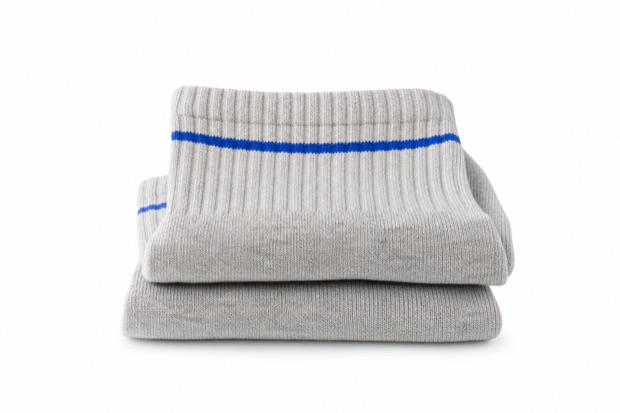 3-for-2Premium socks$5.99
Buy more, save more
- 1 unit$5.99
- Buy 3, pay for 2Best sellerYou save $5.99$11.98
- Buy 6, pay for 4Best valueYou save $11.98$23.96
What you can do
Packs that make buying more the obvious choice.
A volume discount rewards shoppers who take more units. You choose the packs and CrossUp shows them where the decision happens.
2-for-1, 3-for-2 and custom packs
Use the ready-made packs or build your own by setting how many units they take and how many they pay for, up to 6 units per pack.
Several packs at once
Up to 5 packs in the same campaign. Your shopper chooses and always gets the best pack they reach; you mark the recommended one.
Same product or mixed pack
A pack of the same product —3 beanies, pay for 2— or a mixed pack of up to 6 different products where the cheapest one is free.
Schedule it
Always on or between two dates: for a long weekend, a change of season or a special date.
Looks like your store
Sync colors, font and borders, write the copy and add a badge such as “Best seller” or “Best value” to each pack.
Badge on the photo
Optionally, a pack badge on the product photo announces the promo in categories, search, the home page and carousels.
Where your shopper sees it
The savings, right next to the buy button.
Packs show up where your shopper decides how many to take, and the badge invites them in from any listing.
On the product page
Next to the purchase options: they pick 1 unit or a pack, see how much they save and add it to the cart.
Across your store listings
The pack badge on the product photo in categories, search, the home page and carousels.
How to set it up
One campaign, one screen.
With a name, the packs and the product you can already turn it on; everything else comes with defaults that work.
Install CrossUp
From the Tiendanube App Store. Your catalog syncs on its own.
Create the campaign
Widgets → Quantity promos → New campaign
Choose the type: a pack of the same product or a mixed pack.
Pick the packs and the product
2-for-1, 3-for-2 or a custom one, up to 5 packs per campaign, and the product —or the products of the mixed pack— they apply to.
When and how it looks
Always on or scheduled, copy, colors and badges, with a desktop and phone preview.
Turn it on
Activate campaign
The campaign goes live on the product page and you can pause it from the list whenever you want.
How it is measured
What each campaign sells, in plain sight.
The campaign list shows, for each one, how many units it sold and how much revenue it brought in over the last 30 days, along with its status: active, scheduled or paused.
- Units soldHow many units went out with each campaign.
- RevenueWhat each campaign brought in over the last 30 days.
- StatusActive, scheduled, paused or expired, with a manual on/off switch.
Which plan includes it
Volume discounts in all three plans.
Impulso, Escala and Evolución all include volume campaigns: you get them from the very first plan.
Impulso
For getting started with better conversion
Volume discountsIncluded
Escala
For growing stores
Volume discountsIncluded
Evolución
For high-volume operations
Volume discountsIncluded
Frequently asked questions
Volume discounts on Tiendanube
Packs, units, mixed products, plans and what shows when there is more than one offer.
Start your free trialHow do I set up a 2-for-1 or a 3-for-2 on Tiendanube?
With CrossUp: in the dashboard open Widgets → Quantity promos, create a campaign, choose the pack —2-for-1, 3-for-2 or a custom one— and the product, then activate it. The packs show up on your store’s product page.
Can I offer several packs for the same product?
Yes, up to 5 per campaign, each starting at a different quantity. Your shopper chooses and always gets the best pack they reach.
How many units can a pack have?
Up to 6. Use the ready-made packs, like 2-for-1 or 3-for-2, or build your own by setting how many units they take and how many they pay for.
Can I build a pack with different products?
Yes, with the mixed pack: group up to 6 products and the cheapest one is free, from 2-for-1 up to 6-for-5.
How do I discount the second unit?
With a pack: a free second unit is a 2-for-1, and 3-for-2 or 4-for-3 spreads the savings across more units. Campaigns are built from how many units your shopper takes and how many they pay for.
Which plan includes volume discounts?
All three: Impulso, Escala and Evolución include volume campaigns. Each plan’s details are on the plans and pricing page.
What if the product also has a bundle?
Each product shows a single offer, in this order: the bundle first, then the volume discount and then the recommendations.
Go deeper
Guides from the blog
How to get the most out of it, with examples for your store.
- Volume discounts: 2-for-1, 3-for-2 and packsHow 2-for-1, 3-for-2 and custom packs work, when to use each one and how to set up a volume campaign in CrossUp for your Tiendanube store.Read the guide
- Kits, bundles or packs: how to choose the right offerBundles, kits and packs serve different goals. A table to choose the format for each product and how to make them work together in your store with CrossUp.Read the guide
- Bundles that work: how to build bundles and kits that sell, by hand or with AIRelevance, incentive and timing: what makes a bundle sell, which types to build and how to create AI bundles and kits of 2 to 6 products on Tiendanube.Read the guide
All in one app
More ways to grow average order value
Recommendations, bundles and volume discounts run from the same dashboard and are measured with the same order-level attribution.


CrossUp for TiendanubeHow SalesPilot decidesPlans and pricing
Launch your first volume campaign.
Install CrossUp in your Tiendanube store, pick your 2-for-1 or 3-for-2 and turn it on from a single screen.