
Related products on Tiendanube: how to choose and show them
Complements, alternatives, upgrades and variants: which related product to show at each of the five Tiendanube moments, how to combine SalesPilot with your rules and how to measure every sale.

In short
Related products are complements, alternatives or upgrades to the item a shopper is viewing or buying. On Tiendanube they work best when each moment shows the right relationship: complements on the product page and at add to cart, what's missing in the cart, something simple at checkout and the next purchase on the thank-you page. CrossUp automates them with SalesPilot and measures them order by order.
Showing related products on Tiendanube (Nuvemshop in Brazil) takes more than a "you may also like" row at the bottom of the product page: for every product and every step of the purchase, you have to decide which relationship is worth showing. With CrossUp, that decision is made by SalesPilot, CrossUp's AI, based on your catalog and your orders, and you add your own rules wherever you want the final say. This guide covers the types of related products, where each one works best and how to tell whether they sold.
What are related products?
A related product is any item in your catalog that makes sense to show next to another one. But "related" bundles four different relationships, and it pays to separate them because each one does a different job:
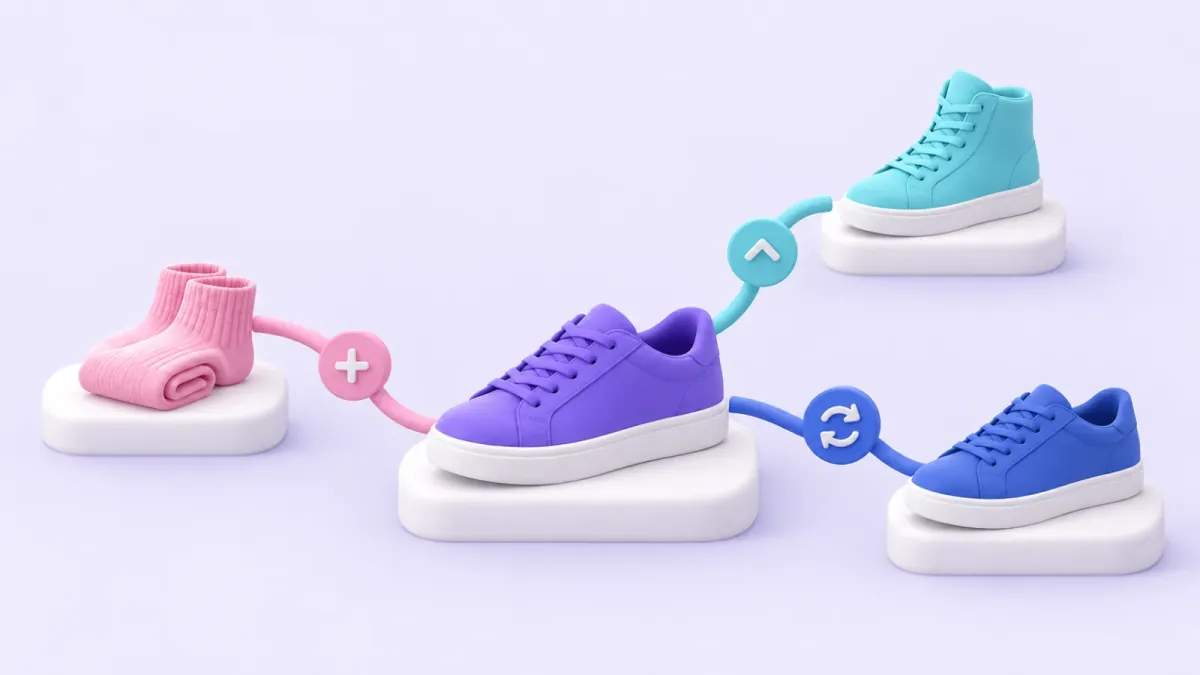
- Complement: it is used with the product and completes the purchase. Socks for the sneakers, filters for the coffee maker, a case for the phone.
- Alternative: it solves the same need in a different way. Another running shoe with a different fit, another serum for the same skin type.
- Upgrade: the same need, with more features or a bigger size. The sneaker with better cushioning, the 15 kg pack of dog food.
- Variant: the same product in another color, size or dimension. It is not a recommendation: it is a choice the shopper makes inside the product page.
An illustrative example from a footwear store: for a casual sneaker, socks are a complement, another model from the same line is an alternative, the leather version is the upgrade and the same model in black is a variant. All four are "related", but only one fits each moment. Showing three more sneakers right after someone adds one to the cart doesn't help: it competes with the decision they just made. A pair of socks, on the other hand, completes it.
Where should you show them on Tiendanube?
CrossUp can show recommendations at five moments of the Tiendanube shopping journey: the product page, add to cart, in the cart, at checkout and on the thank-you page. Each moment reflects a different intent, so each one calls for a different relationship. We cover this in depth in the five conversion moments of an e-commerce store; here is the practical version, with illustrative examples from different verticals:
| Moment | Shopper intent | Right relationship | Illustrative example | Metric |
|---|---|---|---|---|
| Product page | Evaluating, hasn't decided yet | Complements and, if they hesitate, one alternative | Viewing a city backpack: a water bottle, or the same backpack in 30 liters | Products added from the recommendation |
| Add to cart | Just decided | One direct complement at a sensible price | Adds a coffee maker: filters or whole-bean coffee | Accepted offers |
| In the cart | Reviewing the total, looking for what's missing | Complements to everything they picked | Has a T-shirt and shorts: socks or a cap | Products added per order |
| At checkout | About to pay | A simple, low-priced product added with one tap | Buying a face cream: a lip balm | Acceptance and attributed revenue |
| Thank-you page | Already bought and trusts the store | The next purchase: a refill or a complement | Bought cat food: treats or cat litter | Attributed revenue |
You don't need to turn on all five at once. The sensible move is to start with the product page and add to cart, where intent runs high, measure for a few weeks and add the rest as you see what works in your store.
Which product should you recommend at each moment?
The underlying rule is simple. Before the purchase, the shopper is still choosing, so there is room for complements and for one alternative if they seem unsure. During the purchase, the decision is made: what adds value is completing it, not reopening the choice. After the purchase, the opportunity is the next one: what gets reordered, or what is used with what they just bought.
A few practical rules that work in almost any vertical:
- The complement follows the product's price. For a sneaker, socks at a tenth of the price get added almost without thinking; another sneaker doesn't. For a laptop, a mouse or a sleeve; the monitor can wait for the thank-you page.
- Never recommend what is already in the cart. It sounds obvious, but nothing kills a recommendation's credibility faster.
- One clear offer beats ten options. In the cart, a single carousel; at checkout, a single suggestion.
- In apparel and footwear, mind size and gender. Recommending women's pants to someone buying a men's T-shirt looks like a mistake, even if both sit in the same category.
- In pets, beauty and food, think about refills. The thank-you page is the natural place for repeat purchases: the next pack of food, the cream refill, next month's coffee.
- In home and decor, think in rooms. Someone buying a sofa is putting together a living room: a side table or a few cushions complete that scene better than another sofa.
How does CrossUp combine AI with your rules?
At each moment, you choose who decides. If you turn on SalesPilot, CrossUp's AI picks the related products for every visit: it looks for candidates among the products your customers buy together, adds similarity signals when they are available, and filters by stock, price and your exclusions. If you'd rather call the shots, you create a manual suggestion: you pick the triggers (the products or categories that activate it) and the recommended items (what gets shown), with a date range and exclusions. And you can combine both: pin the pairs that matter to you and let SalesPilot cover the rest of the catalog.
Three controls worth knowing:
- Pinned pairs. On the product page and at add to cart, you can create manual suggestions for the products you want to push: a launch, a high-margin item, stock you need to move.
- Exclusions per moment. You tell SalesPilot which products or categories not to recommend at each moment: gift cards, pre-orders or anything you don't want at checkout.
- Bundles come first. If the product a shopper is viewing belongs to an active bundle, CrossUp shows that bundle first on the product page and at add to cart. Your commercial judgment leads.
We compare when each approach fits in AI cross-selling vs. manual rules. The short answer: with a small catalog, a few well-thought-out rules are enough; with hundreds or thousands of products, SalesPilot covers what makes no sense to set up by hand, and you keep the decisions that matter.
How does SalesPilot avoid out-of-context recommendations?
An out-of-place recommendation tells the shopper the store isn't listening. That's why, before showing a product, SalesPilot runs every candidate through several filters:
- Available: it has to be published and in stock. Variants you hid don't show up.
- New to the shopper: it doesn't recommend the product they are viewing or anything already in their cart.
- Sensibly priced: at add to cart, the suggestion stays within a reasonable range of what they are buying.
- Backed by your orders: a one-off coincidence isn't enough; to use co-purchase data, the pattern has to repeat. We explain it in frequently bought together: choosing product pairs.
- Within your rules: it respects your exclusions and your pinned pairs.
Behind those filters sits your store's product map: the way SalesPilot connects catalog, order, variant and co-purchase signals to tell a complement from an alternative or a simple variant. It's the logic that aims to show socks, not another sneaker, when someone adds a sneaker to the cart.
How is an accepted recommendation measured?
CrossUp measures order by order. When a shopper accepts a recommendation and ends up buying that product, its value is attributed to the recommendation, to the moment where it appeared and to the product that triggered it. The product the shopper had already chosen, rejected recommendations and orders without an accepted offer stay out of the calculation. That's attributed revenue: the extra revenue you can trace back to the order.
With that data, your dashboard shows which moment performs best in your store, which pairs convert and which ones to exclude. For reference, CrossUp publishes +9.2% in average order value as the average across the stores it has measured since May 2025; each store's result depends on its vertical and catalog.
How do you turn on related products on Tiendanube with CrossUp?
- Pick the moment. Start with the product page and add to cart.
- Define the goal. Add a complement, lift the ticket with an upgrade or move specific stock.
- Turn on SalesPilot or create a rule. SalesPilot to cover the whole catalog; a manual suggestion for the pairs you want to lock in.
- Exclude what doesn't fit. Products or categories you don't want to recommend at that moment.
- Check it in your store. Browse as a customer, open a product page and add something to the cart to see what appears.
- Measure and adjust. Track acceptance and attributed revenue per moment, and add the next moment once the first one is running.
Turn on related products with SalesPilot in your Tiendanube store: install CrossUp with a 15-day free trial and choose your plan on the pricing page. To see everything it includes, visit related products with CrossUp. And for examples by vertical, see how it works in footwear and shoe stores and technology and electronics stores.
Frequently asked questions
What is the difference between a related product and a similar one?
A related product usually completes the purchase, like socks for a sneaker. A similar product is another option for the same need, like a different sneaker model.
Can I pick related products by hand?
Yes. On the product page and at add to cart you can pin pairs with manual suggestions and let SalesPilot cover the rest of the catalog.
Where do they appear on Tiendanube?
At five moments: the product page, add to cart, in the cart, at checkout and on the thank-you page. Each one can be turned on or paused separately.
How do I know whether a recommendation sold?
CrossUp links each product added from a recommendation to the order that bought it and shows attributed revenue by moment and by product.
Can out-of-stock products be recommended?
No. SalesPilot only recommends published, in-stock products, and it doesn't show variants you hid.