
Product map: how it connects your catalog
What a product map is, which relationships it connects (complements, alternatives, variants, kits and co-purchases) and how SalesPilot uses those signals to recommend the right item at each moment and put your bundles first.

In short
A product map is the network of relationships between a store's items: what complements what, what is an alternative, what is just another variant, what belongs to a kit and what gets bought together. SalesPilot, CrossUp's AI, connects catalog, order, variant and co-purchase signals, and respects your bundles and rules, to pick the right recommendation at each moment.
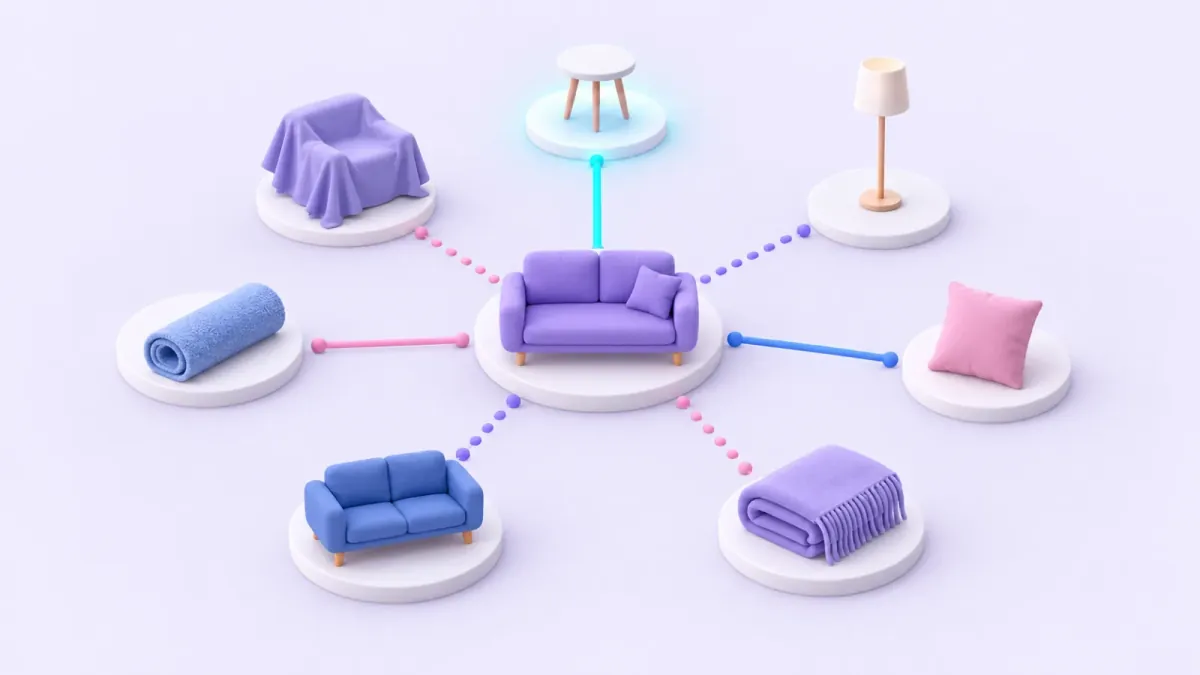
When someone looks at a sofa in your store, there is a side table that goes with it, a smaller sofa they might prefer, a slipcover that belongs to the same kit and a set of cushions other customers bought with that model. Those relationships make up your store's product map, and understanding them is what lets SalesPilot, CrossUp's AI, recommend on Tiendanube what fits each moment of the purchase: not the same best-sellers for everyone, but what goes with what that shopper is looking at.
Editor's note · October 2026. This article explains how SalesPilot understands the relationships between your products. That work already runs behind your store's recommendations: SalesPilot connects catalog, order, variant and co-purchase signals, and respects the bundles and rules you set. The view for exploring the map from your dashboard is in development; in the meantime, the map is already at work where it shows the most: in what your store recommends at each moment.
What is a product map?
A product map is the network of relationships between the items in a store. Each product is a point, and each relationship is a named connection: "goes well with", "is an alternative to", "is another variant of", "comes in the same kit as", "is bought together with".
What sets it apart from a list of related products is the name of the connection. A list tells you "these products have something to do with the sofa". The map tells you what they have to do with it. And that changes the recommendation: a side table and another sofa are both "related" to the sofa the shopper is viewing, but only one of them is worth showing right after they add it to the cart.
Think of it as a neighborhood map. Knowing that two places are close doesn't get you there: you need to know which street connects them and where it leads. Products work the same way. Knowing that two items have something in common is the starting point; knowing how they relate is what makes a good recommendation possible.
Which relationships can it connect?
The relationships in a product map fall into six types. The examples are illustrative, from a home and decor store:
| Relationship | Plain explanation | Illustrative example | Where it helps |
|---|---|---|---|
| Complement ("goes well with") | It is used with the product and completes the purchase | Sofa → side table | Product page, add to cart and in the cart |
| Alternative | It solves the same need in a different way | Three-seat sofa → two-seat sofa | Product page, while the shopper is still choosing |
| Upgrade | The same need with more features | Sofa → sofa bed | Product page |
| Variant | The same product in another color, size or dimension | Gray sofa → the same sofa in green | Inside the product page; not offered as a complement |
| Kit | Products sold as a set | Sofa + slipcover + cushions in a bundle | Product page and add to cart |
| Co-purchase ("bought together") | They appear together in many of your store's orders | Sofa + cushions | Add to cart and at checkout |
Some relationships overlap, and that's fine. Cushions can be a complement and a co-purchase at the same time: being used with the sofa and already being bought with it by your customers is the best signal there is. Others rule each other out: a variant should never appear as a complement, because offering someone the same sofa in another color after they picked theirs completes nothing.
Where do the relationships come from?
SalesPilot connects signals that already exist in your store. You don't need to upload anything new:
- Your catalog. Names, descriptions, categories, prices and images say what each product is. With that, SalesPilot can use similarity signals when they are available to find comparable alternatives.
- Your orders. Which products show up together, again and again, in the same orders. That's the co-purchase signal, covered in detail in frequently bought together: choosing product pairs.
- Your variants. Colors, sizes and dimensions of the same product. Recognizing them avoids mistaking "another option of the same product" for "another product". Variants you hid are never recommended.
- Your bundles. Every bundle you build is a relationship you declare yourself: these products are sold together.
- Your rules. The pairs you pin by hand and the exclusions you set for each moment.
- What happens in your store. Which recommendations get accepted and which don't, plus the stock available at each moment.
No signal decides on its own. A co-purchase may come from a promotion; similarity may pair two products nobody would buy together. The value is in crossing them: when the catalog says "this is used with that" and the orders confirm it, the relationship is strong.
How does SalesPilot use the map when it recommends?
The best way to understand it is to follow, as an example, the reasoning during one visit to an illustrative decor store. Someone opens the product page of a three-seat sofa and adds it to the cart:
- It identifies the current product. The starting point is the sofa the shopper just added.
- It reads its relationships. From the map come the side table (complement), the cushions (complement and co-purchase), the two-seat sofa (alternative), the same sofa in green (variant) and the bundle with the slipcover.
- It sorts them by moment. The sofa was just added, so the decision is made: alternatives and variants move to the background. The table, the cushions and the bundle stay up front.
- It applies stock and rules. If the product belongs to an active bundle, the bundle goes first. If not, it drops anything out of stock, anything priced out of context and anything you excluded.
- It picks what to show. The strongest relationship wins: the cushions, which are used with the sofa and are also often bought with it.
- It measures the response. If the shopper adds them and buys them, that sale is attributed to the recommendation, order by order.
If, instead of adding it to the cart, the shopper keeps browsing the product page, step 3 changes: they are still choosing, so an alternative (the two-seat sofa, or the sofa bed) can make as much sense as a complement.
What changes at each moment of the purchase?
Each of the five conversion moments calls for a different relationship from the map:
- Product page: complements and alternatives. The shopper is evaluating and benefits from seeing what goes with it and what other options exist.
- Add to cart: one direct complement, not another alternative to the product they just chose.
- In the cart: what's missing, looking at the whole cart rather than a single product.
- At checkout: something simple and low-priced, related to what they're buying, added with one tap.
- Thank-you page: the next purchase. In the decor store, an upholstery cleaner or a throw for the same sofa.
Without a map, every moment ends up showing the same thing: the best-sellers or the most similar items. With a map, each moment uses the relationship that fits it. That's what we explain in the practical guide to related products, and what you put to work with CrossUp related products.
How do bundles fit into the map?
Bundles are the most explicit relationship of all: the one you build yourself. That's why they take priority. If the product a shopper is viewing belongs to an active bundle, CrossUp shows that bundle first on the product page and at add to cart.
The map also helps you decide which bundles to create. Three simple criteria:
- Complements that repeat in your orders: these are the best bundle candidates. They already sell together and they are used together.
- The same product, repeated: if shoppers take three of the same cushion, that's not a bundle, it's a quantity pack. A volume discount fits better there.
- Variants: they don't make a bundle. The same sofa in two colors is a choice, not a set.
In CrossUp you can build the bundle by hand, with 2 to 6 products, or ask SalesPilot for one in a sentence and review the proposal before publishing it.
What can you control?
The map works behind the scenes, and you set the commercial boundaries:
- Active moments: you choose where to recommend and can pause any moment.
- Pinned pairs: on the product page and at add to cart, you create manual suggestions for the products you want to lock in.
- Exclusions: products or categories you don't want recommended at each moment.
- Bundles: which products go together, with what discount, where and until when.
Your rules don't compete with the map: they complete it. The map brings what emerges from your catalog and your orders; your rules bring what you know about your business that no data shows yet, like a launch or stock you need to move. We cover how to combine the two in AI cross-selling vs. manual rules.
What does the map do for your store today?
In your store's recommendations, SalesPilot already works with:
- what your customers buy together, based on your orders;
- what your catalog says: what's published, what's in stock and what price makes sense next to the product;
- the visible variants of each product;
- similarity signals, when they are available;
- your bundles, your pinned pairs and your exclusions.
The view for exploring the map from your dashboard is in development. When it's ready, you'll find it there and we'll cover it on this blog. To learn more about how the AI decides, read what SalesPilot is and what data it uses.
See how SalesPilot connects the signals in your catalog: install CrossUp on your Tiendanube store with a 15-day free trial and turn on recommendations at the moment you prefer.
Frequently asked questions
Is a product map just a list of related products?
It goes further: besides connecting products, it tells apart the type of relationship (complement, alternative, variant, kit or co-purchase) and the moment where each one helps.
What information does it use?
Your catalog, your orders, the variants of each product, co-purchases, your bundles and rules, and what happens in your store with each recommendation.
Can I see the map in my dashboard?
The view for exploring it from the dashboard is in development. Today the map works behind your store's recommendations, and you steer it with your rules, exclusions, bundles and active moments.
Does the map replace my manual rules?
No. Your pinned pairs, exclusions and bundles still set the commercial boundaries, and active bundles take priority.
Does a relationship guarantee a sale?
No. It is a signal for deciding what to show in a specific context; what sells is measured order by order as attributed revenue.